
 StockControls
Keep stock decisions in context.
Review stock changes, receive purchase orders and plan replenishment with context.
Continue on stockcontrols.com. Downloads and demos follow that product’s current terms.
Choose by the work
Start with what you need.
StockControls Free
You need inventory editing, immediate manual corrections with reasons/history, reviewed CSV, suppliers, purchase orders and full or partial receiving.
- Inventory search and saved views
- Reviewed adjustments with reasons
- Small and resumable CSV workflows
StockControls Pro
You need saved/resumable count lists, variance review and reconciliation, or existing team/blind counts, replenishment and shipment review.
- Saved and resumable stocktake workspaces
- Explained replenishment priorities
- Supplier baskets and constraints
Current availability. Free and Pro 1.1.25 are the current matching website packages. Free is public; eligible annual Pro accounts receive the separate add-on. Install Free first, retain it with Pro and review edition-specific requirements before changing stock.
Explore all 10 capabilities and their limits
Free includes
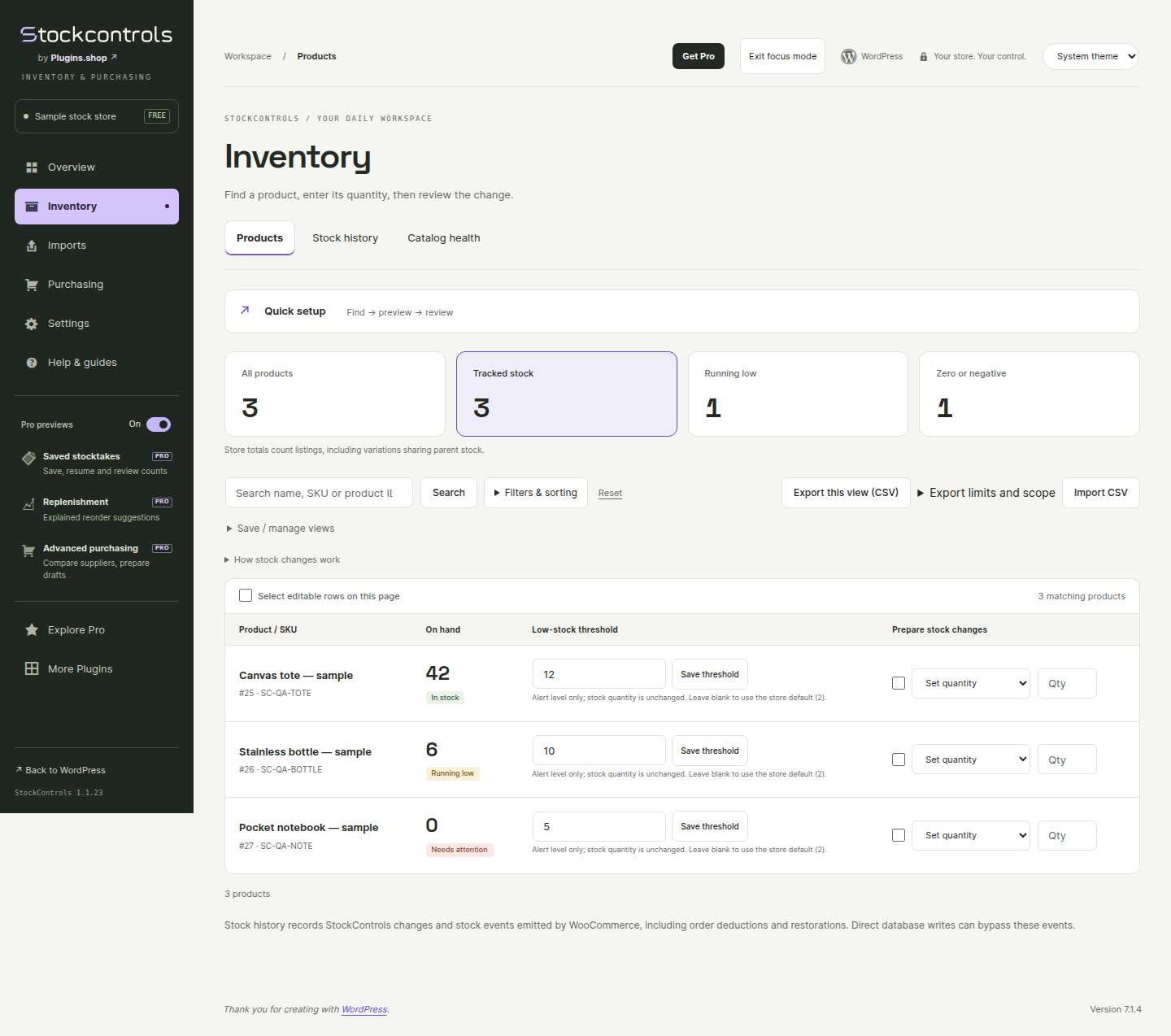
- Inventory search and saved viewsProducts/variations, shared-parent stock labels, low-stock review and ten saved views.
- Reviewed adjustments with reasonsBefore/after stock changes with reason and stale-state checks; movement history covers supported WooCommerce hooks.
- Small and resumable CSV workflowsSmall imports up to 200 rows/1 MB and resumable imports up to 10,000 rows/10 MB, plus complete exports.
- Suppliers, purchase orders and receivingLocal PDF/print/CSV, partial or full receiving and reasoned amendment/cancellation. These are not Pro-only features.
Pro adds
- Saved and resumable stocktake workspacesSingle-operator saved count lists, progress, variance review and stored reconciliation. Immediate manual corrections remain Free; stale-stock and retry safeguards apply in both editions.
- Explained replenishment prioritiesRecent sales, stock cover, lead times and refreshed demand support reviewed suggestions.
- Supplier baskets and constraintsPack/minimum-order quantities, alternatives and supplier planning; suggestions do not order automatically.
- Team counts and shipment reviewBlind counts, recount and approval workflows, plus multi-line shipment review.
- Saved replenishment plans and decision exportsSave complete plans for up to 50,000 stock owners within documented host limits. Export the displayed decision page, up to 25 products; suggestions do not place supplier orders.
- Repeatable stock counts and attention remindersReuse a saved selection as a new blank count. Optional local reminders, staff summaries and no-net-sales/high-cover attention support a reviewed workflow.
Find the next tool in the sidebar.
Both editions include focused sidebar navigation, Help & guides and More Plugins. In Free, the Pro previews On/Off switch remembers the WordPress user’s choice on this site; it hides sample previews without disabling Free tools.
An example workflow
Receive part of a supplier order and make an immediate manual correction in Free. Use Pro to save a stocktake, resume its progress, review variance and reconcile safely.
Requirements, setup and important limits
Requirements and first steps
Free: WordPress 6.5+, PHP 7.4+ and WooCommerce 9.1+. Pro: WordPress 6.6+, PHP 8.1+, WooCommerce 9.1+ and Free 1.1.23+/API 2 (matching 1.1.25 recommended). Requires MySQL/MariaDB named locks, InnoDB and the standard WooCommerce product data store; network activation is unsupported.
- Back up the store and test on staging. Download Free from StockControls.com, upload the ZIP through WordPress → Plugins → Add New Plugin → Upload Plugin and activate.
- Review inventory and shared-parent stock labels. Try one small, reasoned stock adjustment on a test product and inspect its movement history.
- For imports or receiving, preview the CSV or purchase order first, review quantities and conflicts, then approve the intended changes. Verify partial receiving before using real supplier work.
- For saved stocktakes and replenishment tools, install the matching Pro add-on after Free, review and activate its site licence, and keep both active. Update Free before Pro without uninstalling.
Activation, updates and licences
Free needs no account. Optional welcome communications can be skipped. Pro requires a reviewed first site activation; supplier suggestions remain subject to explicit human review.
Straight answers
Questions about StockControls
What is available to download or purchase?
Free and Pro 1.1.25 are the current matching website packages. Free is public; eligible annual Pro accounts receive the separate add-on. Install Free first, retain it with Pro and review edition-specific requirements before changing stock.
What data does the public demo use?
The browser workspace uses fictional products and suppliers. It has no customer account or connection to a live store.
Where should I get the installer and support?
Use StockControls.com for the current release and support. This catalogue does not host installers or process purchases. Free and Pro can be separate plugins; follow the product’s installation instructions.
What does installation require?
Free: WordPress 6.5+, PHP 7.4+ and WooCommerce 9.1+. Pro: WordPress 6.6+, PHP 8.1+, WooCommerce 9.1+ and Free 1.1.23+/API 2 (matching 1.1.25 recommended). Requires MySQL/MariaDB named locks, InnoDB and the standard WooCommerce product data store; network activation is unsupported.
Do I need an account or optional signup to start?
Free needs no account. Optional welcome communications can be skipped. Pro requires a reviewed first site activation; supplier suggestions remain subject to explicit human review.
Go to the source
Your next step, in the right place.
Product details checked 4 November 2026. Interface images use demonstration data; their captions identify the source.
Different job? Another useful tool.
Related tasks, not a tested integration or a requirement to install more plugins.