
 OrderWorth
Understand what an order contributes.
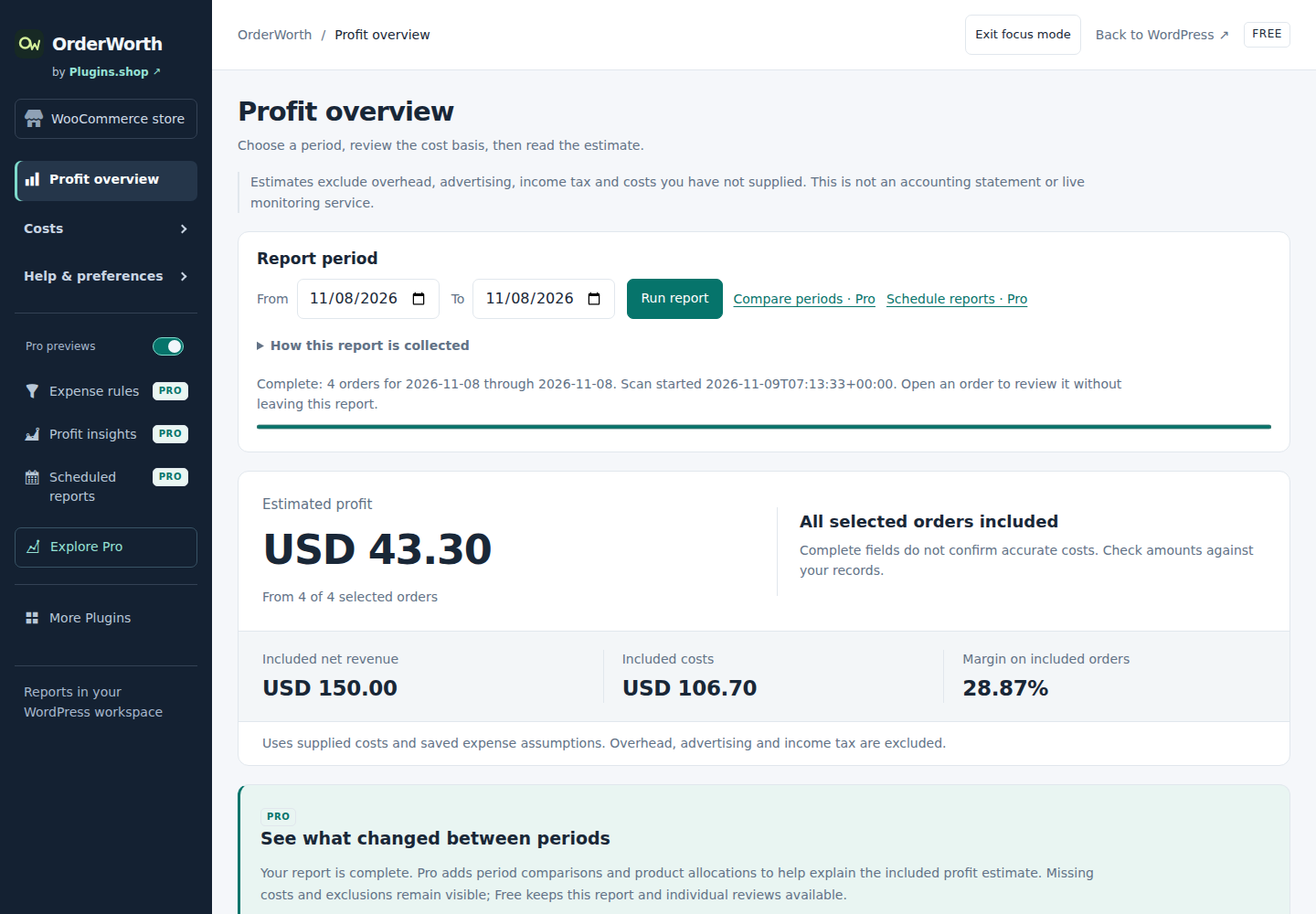
See order contribution after recorded product costs, expenses and refunds.
Continue on orderworth.com. Downloads and demos follow that product’s current terms.
Choose by the work
Start with what you need.
OrderWorth Free
You need manual contribution reports, manual payment/shipping expenses, global defaults, recorded expense snapshots, cost review and guarded imports.
- Historical order contribution reports
- Cost gaps, losses and order review
- Manual CSV cost imports with guarded undo
OrderWorth Pro
You need reusable conditional expense rules by payment/shipping method, period comparisons, background reports, scheduled workflows or deeper analysis.
- Conditional payment and shipping expense rules
- Comparisons, trends and allocation
- Larger resumable background reports
Current availability. Free 1.10.23 and the separate Pro 1.10.23 add-on are the current matching pair. Get Free from WordPress.org and eligible Pro downloads from My purchase. Install or update Free first, then Pro, without uninstalling; keep both active for Pro tools. Free needs no account or licence. Pro requires initial site activation, and current purchase access for protected downloads and updates.
Explore all 11 capabilities and their limits
Free includes
- Historical order contribution reportsManual reports include product costs, fees, shipping and refunds. General business overhead remains outside the estimate.
- Cost gaps, losses and order reviewFind missing costs, low margins and losses; inspect order and refund details rather than treating revenue as profit.
- Manual CSV cost imports with guarded undoImports up to 8 MiB with review and a guarded 24-hour undo window.
- Manual expenses, global defaults and recorded snapshotsAlready recorded expense values remain readable and included correctly. Shared calculation accuracy is not an edition feature; analytical report exports remain Pro.
Pro adds
- Conditional payment and shipping expense rulesCreate/configure and apply reusable per-method rules to future work. Stored rules remain retained if Pro is missing; incomplete inputs stay explicit.
- Comparisons, trends and allocationPeriod comparisons, profit changes, product/category/refund allocation and weekly/monthly trends.
- Larger resumable background reportsUp to 100,000 orders within documented resource limits; this is a processing ceiling, not a guarantee for every host.
- Scheduled packs, alerts and private sharesRecurring report packs and alerts; share completed reports through the product’s protected workflow.
- Processor and shipping cost assistanceSupported Stripe, PayPal and WooPayments versions; reviewed shipping/ShipStation CSV, not a ShipStation API connection.
- Recurring imports and review workspaceSaved mappings, imports up to 10,000 rows/8 MiB, review queues, notes, scenarios and ten saved presets.
- Historical currency conversionUse supported locked historical rates where eligible; inspect currency assumptions before comparing reports.
An example workflow
Review an order using manual costs and recorded expenses in Free. Use Pro to configure conditional payment/shipping expense rules for future work. Identical recorded inputs retain identical arithmetic.
Requirements, setup and important limits
Requirements and first steps
WordPress 6.7+, WooCommerce 9.9+ and PHP 7.4+. Enable native WooCommerce Cost of Goods Sold (COGS), review supported currency precision and confirm expense assumptions. Minimum declarations do not mean every version combination has been tested.
- Back up the store. Install or update Free 1.10.23 from WordPress.org first, then Pro 1.10.23 from My purchase if you use it. Replace existing editions without uninstalling and keep Free active alongside Pro.
- Open Setup & import. Open WooCommerce features in its separate tab, enable native COGS and return to Recheck setup. Confirm expense assumptions, then use Review missing costs for affected historical orders. Enter original product costs moves to the existing field; use the total for all quantities at the time of sale, before recovery.
- Review a small manual contribution report and its order/refund details. For CSV costs, map and inspect every preview page before approving changes; retain the resulting review record.
- For Pro, install the separate matching add-on after Free, keep both active, then open Pro licence & updates and explicitly activate the purchased site key. Configure advanced rules or scheduled work only after reviewing their inputs.
Activation, updates and licences
Free requires no account or licence. Quickstart installation-sharing and email-signup choices can be skipped. Pro needs first site activation; already activated local reporting continues through ordinary expiry or temporary licence-service outages.
Straight answers
Questions about OrderWorth
What is available to download or purchase?
Free 1.10.23 and the separate Pro 1.10.23 add-on are the current matching pair. Get Free from WordPress.org and eligible Pro downloads from My purchase. Install or update Free first, then Pro, without uninstalling; keep both active for Pro tools. Free needs no account or licence. Pro requires initial site activation, and current purchase access for protected downloads and updates.
What data does the public demo use?
Public reporting examples contain sample numbers. They do not connect to or establish the profitability of your store.
Where should I get the installer and support?
Use OrderWorth.com for the current release and support. This catalogue does not host installers or process purchases. Free and Pro can be separate plugins; follow the product’s installation instructions.
What does installation require?
WordPress 6.7+, WooCommerce 9.9+ and PHP 7.4+. Enable native WooCommerce Cost of Goods Sold (COGS), review supported currency precision and confirm expense assumptions. Minimum declarations do not mean every version combination has been tested.
Do I need an account or optional signup to start?
Free requires no account or licence. Quickstart installation-sharing and email-signup choices can be skipped. Pro needs first site activation; already activated local reporting continues through ordinary expiry or temporary licence-service outages.
Go to the source
Your next step, in the right place.
Release and availability checked 9 November 2026. Interface images use demonstration data; their captions identify the source.
Different job? Another useful tool.
Related tasks, not a tested integration or a requirement to install more plugins.