 ClickClueFREE + PRO PREVIEW
WORDPRESS SESSION REPLAY & HEATMAPS
Turn clicks
into clues.
ClickClue is a WordPress session replay plugin for reviewing clicks, scrolling and page changes. Pro adds click and scroll heatmaps to help you understand how visitors use your pages.
Compare Free & Pro- Works with
- WordPress 6.6+ · PHP 8.1+
- Recordings stored
- On your WordPress server
FOLLOW THE VISIT
Less guesswork.
More context.
For WordPress site owners, publishers and agencies who want to investigate how a page is used before deciding what to change.
Replay the interaction
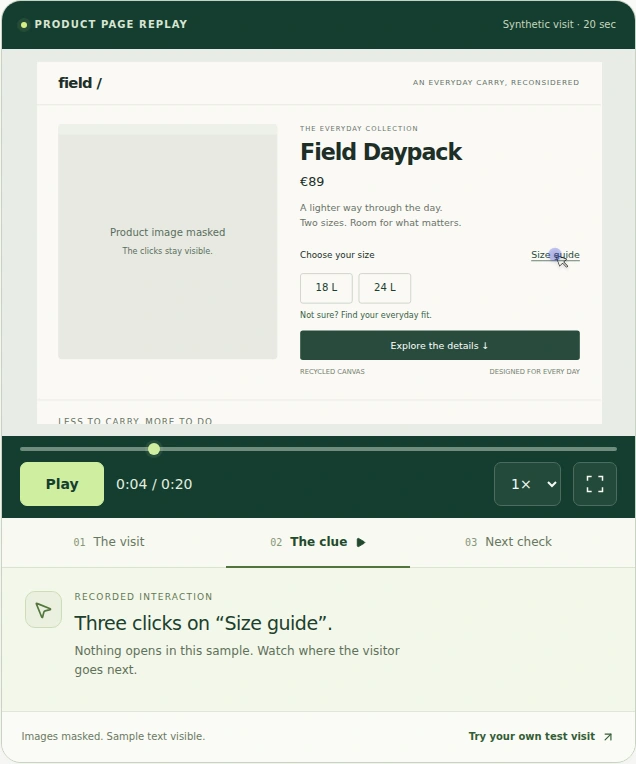
Review clicks, scrolling and navigation. Seek through a visit, change playback speed, skip inactivity and inspect repeated-click markers.
Keep the useful moments
Filter recordings by page, device and date. Bookmark a visit and add notes so the observation is easy to find again.
See the page patterns
Explore click density and scroll reach with Pro heatmaps. Review form interaction signals without collecting entered field values.
CHOOSE YOUR VIEW
One visit.
Or the wider picture.
Free provides the replay workspace. The Pro add-on extends it with page heatmaps and shared review.
CLICKCLUE FREE
Your first useful replay.
- Session replay and playback controls
- Page, device and date filters
- Bookmarks and review notes
- Consent, masking and deletion controls
- Sampling and retention settings
The core plugin for reviewing visits inside WordPress.
CLICKCLUE PRO · PREVIEW
A shared view of the evidence.
- Everything in Free
- Click-density and scroll-reach heatmaps
- Form activity without entered values
- Team roles and account-bound replay invitations
- Connected-site health summaries
Requires the Free plugin. Pro is currently a preview.
This is a product overview. Downloads and paid checkout are not offered on plugins.shop.
CONTROL WHAT YOU COLLECT
Consent first.
Your site. Your data.
ClickClue keeps recordings in dedicated database tables on your WordPress server. Configure the capture rules before recording real visits.
Set the boundaries
Review consent, included pages and private-region exclusions. Form values are masked; page text is masked by default.
Check a sample visit
Test your theme with synthetic data, then inspect the replay. Choose a sampling rate and storage budget your hosting can sustain.
Manage the history
Set retention and review or delete recordings in WordPress. Pro connected-site summaries leave recordings on the site that collected them.
A FEW GOOD QUESTIONS
Before you
press play.
What does ClickClue record?
ClickClue reconstructs website visits from page structure and interaction events, including clicks, scrolling and navigation. It does not record the visitor’s desktop, other tabs, camera or microphone.
Are heatmaps included in ClickClue Free?
Heatmaps are part of the Pro add-on. Free includes session replay, filters, bookmarks, review notes and capture controls. Pro adds click and scroll heatmaps, form activity and team review.
Where are recordings stored?
Recordings stay in your WordPress database. You choose sampling and retention, and can review or delete recordings from the WordPress workspace. Backups and downloaded exports need their own retention policy.
Does ClickClue require WooCommerce?
No. ClickClue works on WordPress sites without WooCommerce. It can help you review content pages, navigation, landing pages and product discovery. WordPress 6.6 or later and PHP 8.1 or later are required.
Can recording affect website performance?
Yes. Recording uses browser and server resources. The capture engine loads after consent, sampling and server authorization checks pass. Test your theme and hosting before increasing the amount you record.
Is ClickClue recording this page?
No. This plugins.shop page is a static product showcase. The replay image uses synthetic data; no ClickClue recorder, analytics script or tracking cookie is loaded here.