
 RedirectNest
Give old links a useful destination.
Manage redirects and review broken-link problems before changing where visitors go.
Continue on redirectnest.com. Downloads and demos follow that product’s current terms.
Choose by the work
Start with what you need.
RedirectNest Free
You need exact redirects, intentional 410 responses, reviewed URL-change suggestions, CSV tools and optional local hit or 404 totals.
- Exact redirects and local testing
- CSV, reviewed conversions and recovery
- Optional local counts and privacy controls
RedirectNest Pro
You need pattern matching, reviewed repair suggestions, migration mapping, monitored destinations or client care reports.
- Wildcard, bounded regex and request conditions
- Smart repair and local Auto-Mapper
- Lifecycle and supported internal-link cleanup
Current availability. Free and Pro 1.1.2 remain current. Annual Pro plans cover 1, 5 or 50 sites and eligible accounts receive protected downloads. Fresh installations use Free first, then Pro; existing pairs update Pro first, then Free without uninstalling.
Explore all 10 capabilities and their limits
Free includes
- Exact redirects and local testing301, 302, 307, 308 and intentional 410 responses; test paths, query handling and loops before relying on a rule.
- CSV, reviewed conversions and recoveryBasic native CSV and supported basic Redirection conversions, row errors, snapshots and export; bulk enable, pause and delete.
- Optional local counts and privacy controlsDaily hit/404 totals, review or ignore decisions, retention, path limits and noise exclusions; recording is optional.
- URL changes and deleted-page reviewChoose a replacement, keep the current state or confirm a 410. Free does not automatically publish suggestions.
Pro adds
- Wildcard, bounded regex and request conditionsPriorities, query/case/slash controls and supported request signals. Conditions are not access controls and require appropriate cache exclusions.
- Smart repair and local Auto-MapperReview explained word/path candidates and compare two XML urlsets before publishing. Suggestions do not establish equivalent content.
- Lifecycle and supported internal-link cleanupReview chains and dated checks; preview one eligible classic HTML page or supported core blocks, with guarded revision recovery.
- Migration workspaces and client reportsRule diffs, destination checks, live verification, sitemap coverage, printable care reports and reviewed server exports; files move separately.
- Monitoring, alerts and schedulesOptional background monitoring and alerts, scheduled rule windows and bounded stored-content scans; WordPress scheduling can run late.
- Review roles and advanced managementPropose-only work and different-administrator approval, reviewed WooCommerce product routes, authenticated REST/CLI and advanced imports.
An example workflow
Move one old service URL with Free. Use Pro for a folder migration where patterns, reviewed mappings and dated destination checks are needed.
Requirements, setup and important limits
Requirements and first steps
WordPress 6.7+ and PHP 8.1+. On MySQL/MariaDB, protected writes need InnoDB options storage, plus network metadata on multisite. WooCommerce is optional for product-specific workflows.
- For a fresh site, install and activate current Free. No account or licence is needed for exact redirects.
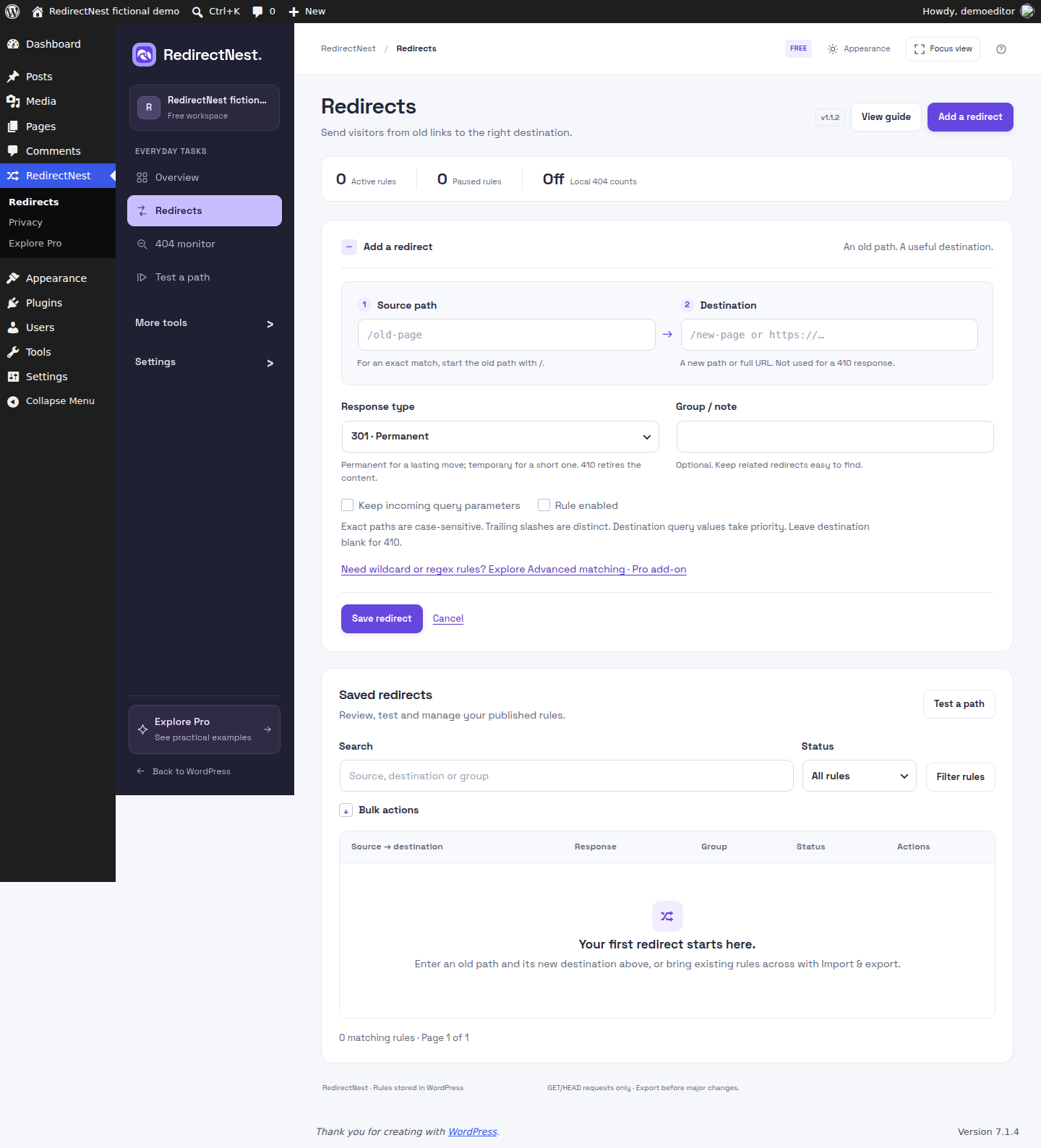
- Open RedirectNest and add an old path and its intended destination. Choose the response deliberately and review query handling.
- Test the rule locally, then check the actual URL separately; server and CDN rules may run before WordPress.
- Enable optional hit/404 recording only after reviewing privacy, retention and scope. Review URL-change suggestions before publishing a response.
- Optional: install matching Pro after Free and activate an eligible site key. For an existing pair, update Pro first and Free second without uninstalling; test representative paths afterward.
Activation, updates and licences
Free needs no customer account. Pro is a separate add-on requiring initial site activation; annual plans cover 1, 5 or 50 sites. Activated local features survive ordinary expiry, while downloads, updates and new activations require current eligibility. Deactivating or removing Pro stops advanced matching while retaining saved rules and recovery data. Refunds, disputes and explicit revocation are separate from ordinary expiry.
Straight answers
Questions about RedirectNest
What is available to download or purchase?
Free and Pro 1.1.2 remain current. Annual Pro plans cover 1, 5 or 50 sites and eligible accounts receive protected downloads. Fresh installations use Free first, then Pro; existing pairs update Pro first, then Free without uninstalling.
What data does the public demo use?
The separate demo uses fictional data in a temporary WordPress workspace, not your production site. Its interface may differ from the current download. The current 1.1.2 image on this guide was captured separately in an isolated installation of the published Free package.
Where should I get the installer and support?
Use RedirectNest.com for the current release and support. This catalogue does not host installers or process purchases. Free and Pro can be separate plugins; follow the product’s installation instructions.
Go to the source
Your next step, in the right place.
Product details checked 3 November 2026. Interface images use demonstration data; their captions identify the source.
Different job? Another useful tool.
Related tasks, not a tested integration or a requirement to install more plugins.