
 OrderFloor
Set minimum orders. Sell in the right quantities.
Set order minimums, quantity limits and pack sizes before shoppers reach checkout.
Get Free on WordPress.org. Demos, Pro plans and support continue on orderfloor.com.
Updated in 1.13.13
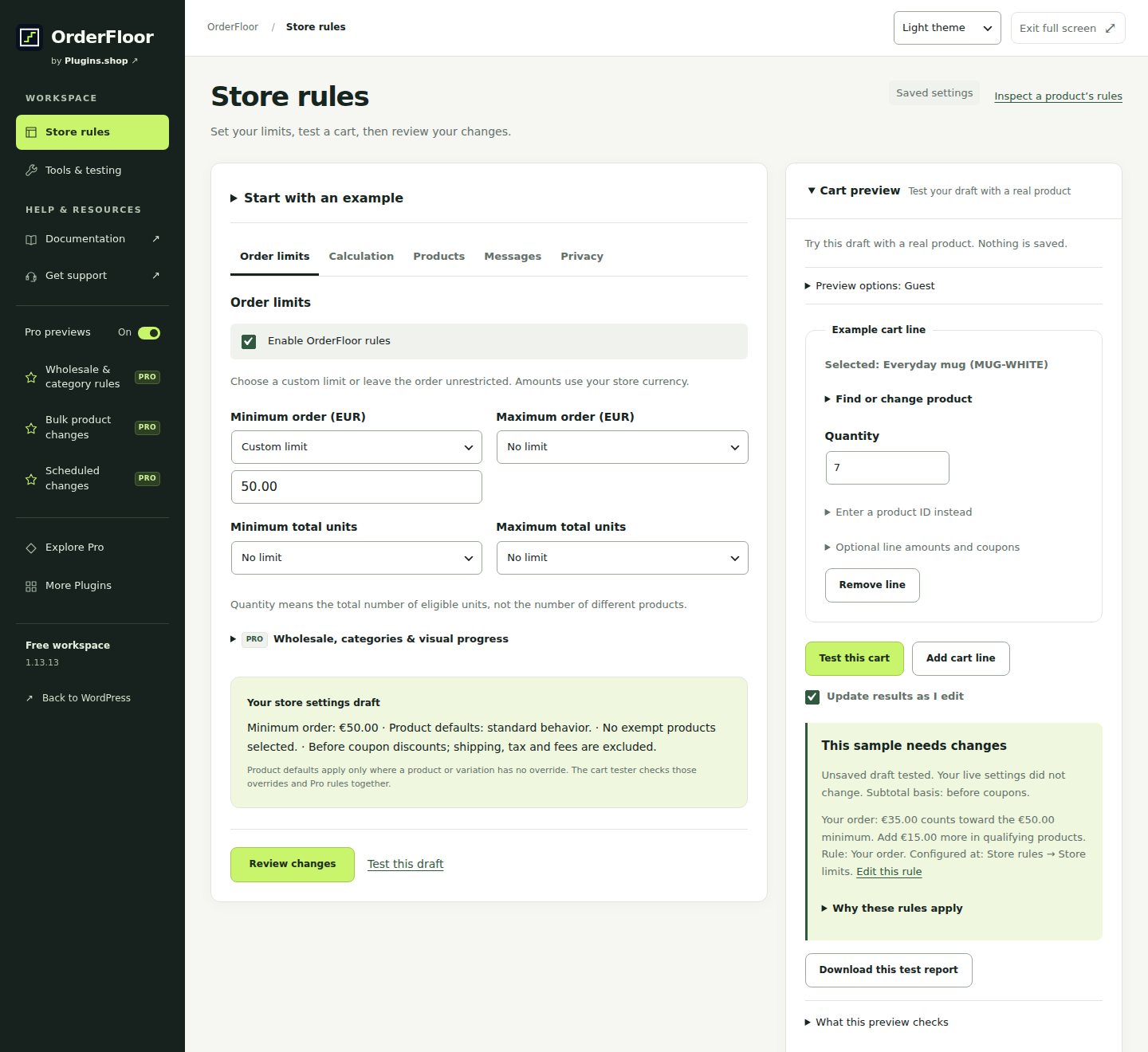
A clearer workspace in 1.13.13.
Free adds a Pro previews switch that remembers your choice for your WordPress account on this site. Help and documentation sit below Tools & testing. More Plugins shows all 16 companion tools with their official bundled logos.
The matching Pro edition keeps its five management tools visible in an expanded sidebar group. Existing licence requirements still apply. Saved rules and checkout enforcement are unchanged.
Install Free from WordPress.org. Existing Pro customers can get the matching add-on through their OrderFloor account.
Choose by the work
Start with what you need.
OrderFloor Free
You need cart spending limits, whole-unit quantities, product or variation packs, six shopper notices and draft cart testing.
- Cart spending and total-unit limits
- Product and variation quantities
- Six editable shopper notices
OrderFloor Pro
You need wholesale or category rules, product spending limits, mixed cases, visual progress, bulk work, transfers, saved suites or schedules.
- Customer-role and category rules
- Product-specific spending limits
- Mixed-variation cases
Current availability. Current matched Free/Pro release 1.13.13. The official website links Free on WordPress.org; eligible accounts supply private Pro. Annual plans have identical Pro features for 1, 5 or 25 registered sites, including staging. Pro needs Free and initial activation on a supported single-site store.
Explore all 14 capabilities and their limits
Free includes
- Cart spending and total-unit limitsSet minimum/maximum qualifying cart subtotal before or after coupons, and minimum/maximum whole units. Tax, shipping and fees are excluded from the subtotal.
- Product and variation quantitiesSet quantity limits, pack multiples and starting quantities. Blank inherits; zero disables an inherited field. Free checks each variation separately.
- Six editable shopper noticesEdit minimum/maximum spend and units, pack-size and whole-unit messages. Value placeholders can show the amount or quantity still needed.
- Stock-aware quantity controlsSupported Classic and Blocks controls account for stock and variations. Classic product forms can use an optional pack dropdown; Blocks retain native controls.
- Presets, cart testing and save reviewTry spend, quantity or pack presets in a draft, test sample carts and review changes before saving. Restore previous store settings after review.
- Product exemptionsExclude samples or other selected products from restrictions and from the qualifying subtotal and unit count.
Pro adds
- Customer-role and category rulesSet different limits for existing customer roles or combined requirements for categories present in the cart. Pro does not create wholesale roles or change prices.
- Product-specific spending limitsSet monetary minimums and maximums for targeted products. Free product fields control quantities and packs; Free spending limits apply to the qualifying cart.
- Mixed-variation casesCombine supported variations of one parent product toward a case requirement. Individual variation restrictions still apply.
- Cart composition and visual progressSet different-product counts and cart-wide pack multiples. Add visual progress, two different-product notices and customer-confirmed quantity corrections.
- CSV, reviewed bulk work and transfersUse product-rule CSV, reviewed batches of 100 products, or resumable jobs up to 5,000 products. Map configuration targets between stores and review conflicts and undo.
- Named suites and optional rechecksKeep up to 20 named suites of 12 scenarios. Publish a reviewed suite to the separate shared library and explicitly enable local rechecks; they never edit live rules.
- Scheduled rule changesReview supported saved-rule values and explicit timezones, then inspect planned and actual activation history. WordPress cron can run late.
- Site moves and handover reportsReview an existing activation move and export a local handover summary. Registered staging sites use the normal 1, 5 or 25-site allowance.
An example workflow
Require a €50 order in Free: a €35 qualifying cart needs €15 more. Set a product to packs of six to allow 6, 12 or 18 units. Add Pro for a wholesale minimum or a case of 12 combining sizes of one product.
Requirements, setup and important limits
Requirements and first steps
WordPress 6.5+, PHP 7.4+ and WooCommerce 8.3+. Test your actual Classic or Blocks checkout, theme and extensions. New Pro activation and automatic Pro updates currently support single-site WordPress only.
- Install and activate WooCommerce and current OrderFloor Free, then open WooCommerce → OrderFloor. Free needs no account or licence.
- Choose a minimum-spend, quantity or pack example to edit a draft. Set qualifying calculation rules and any product exemptions.
- Test representative passing and blocked sample carts, review the proposed differences, then save your settings.
- Verify the actual customer cart and checkout, including coupons, stock, variations and relevant extensions. Edit the six shopper notices if needed.
- Optional: on a new installation, add matching Pro after Free and explicitly activate its licence. When upgrading an existing pair, replace Pro first and Free second without uninstalling.
Activation, updates and licences
Free works locally without an account. Pro needs one initial eligible licence activation per store; staging and distinct home paths count toward the 1, 5 or 25-site allowance. Ordinary expiry or an outage preserves earned local editing. Explicit Disconnect or Remove saved connection locks new Pro changes and pauses jobs, rechecks and schedules while saved checkout rules continue. Eligible downloads and updates are checked separately.
Straight answers
Questions about OrderFloor
Can Free set a minimum for one product?
Free sets product and variation quantity limits and pack sizes. Product-specific monetary minimums and maximums require Pro. Free spending limits apply to the qualifying cart subtotal, excluding tax, shipping and fees.
What does an exemption do?
An exempt product bypasses OrderFloor restrictions and is excluded from the qualifying subtotal and unit count. For example, free samples can stay outside a minimum order requirement.
What is available to download or purchase?
Current matched Free/Pro release 1.13.13. The official website links Free on WordPress.org; eligible accounts supply private Pro. Annual plans have identical Pro features for 1, 5 or 25 registered sites, including staging. Pro needs Free and initial activation on a supported single-site store.
What data does the public demo use?
The interactive demo uses fictional products and sample carts. Explore Free and Pro, edit drafts and inspect results; permanent saves, imports and other persistent actions are unavailable. Validate final rules in your own test store.
Does Free need an account or send store data?
Free rules and sample testing run locally. Optional compatibility sharing and email signup are separate choices that start unchecked. They are not required to use the plugin. Read the privacy policy before choosing a connected service.
Where do I get downloads, updates and support?
Install Free from WordPress.org and use your OrderFloor account for authorized Pro downloads. Eligible Pro updates appear through WordPress after connection. Free updates use the standard WordPress plugin updater. Check release compatibility before updating an installed Free and Pro pair. See the update guide or support centre.
Go to the source
Your next step, in the right place.
Product details reviewed 3 November 2026; release and download links updated 5 November 2026. Interface images use demonstration data; their captions identify the source.
Different job? Another useful tool.
Related tasks, not a tested integration or a requirement to install more plugins.