
 Frictions
Investigate the checkout, not a hunch.
Investigate eligible checkout visits with protected local replay and configurable recording controls.
Free opens WordPress.org. Demos, Pro and support open Frictions.com.
Choose by the work
Start with what you need.
Frictions Free
You want local visual checkout replay, observed errors, replay search, filters and bulk review controls.
- Protected visual checkout replay
- Search, filters and bulk review
- Recording mode, masking and lifecycle controls
Frictions Pro
You want to evaluate organized issue examples, saved views, timestamped notes and developer briefs.
- Guided issue examples and saved views
- Timestamped notes and developer briefs
- Optional alerts and weekly summaries
Current availability. Free 1.2.20 is available from WordPress.org. The separate Pro 1.2.20 add-on is available through Frictions.com and needs first licence activation. Update Free first, then Pro, without uninstalling. Choose a built-in prompt, a supported consent integration or explicitly acknowledged owner-controlled recording; no separate consent plugin is required for the built-in choices. Save and start recording deliberately, then verify a real shopper visit.
Explore all 7 capabilities and their limits
Free includes
- Protected visual checkout replaySupported page styling, visible text, selections and local images/fonts. Textbox values are masked by default; owners can include ordinary typed values. Payment/security regions and passwords remain protected. Not pixel-perfect video; older captures stay structural.
- Search, filters and bulk reviewFind a replay reference, sort recordings, use quick date ranges and filter chips, and bulk-mark watched or bookmarked. Receipt time confirms retained uploads; incomplete reasons do not imply abandonment.
- Recording mode, masking and lifecycle controlsChoose the built-in prompt, a supported consent integration or acknowledged owner-controlled recording. Text-field masking defaults On; the automatic privacy link defaults Off. Opt-out, GPC, DNT, retention and deletion controls remain active. Associated replay data is included in WordPress personal-data exports; recordings stay on your hosting.
Pro adds
- Guided issue examples and saved viewsGroup observed problems and return to a focused investigation as new evidence arrives.
- Timestamped notes and developer briefsAttach context and export Markdown/JSON briefs for a developer to review.
- Optional alerts and weekly summariesOptional WordPress-mail notifications; provider delivery and scheduling need explicit setup.
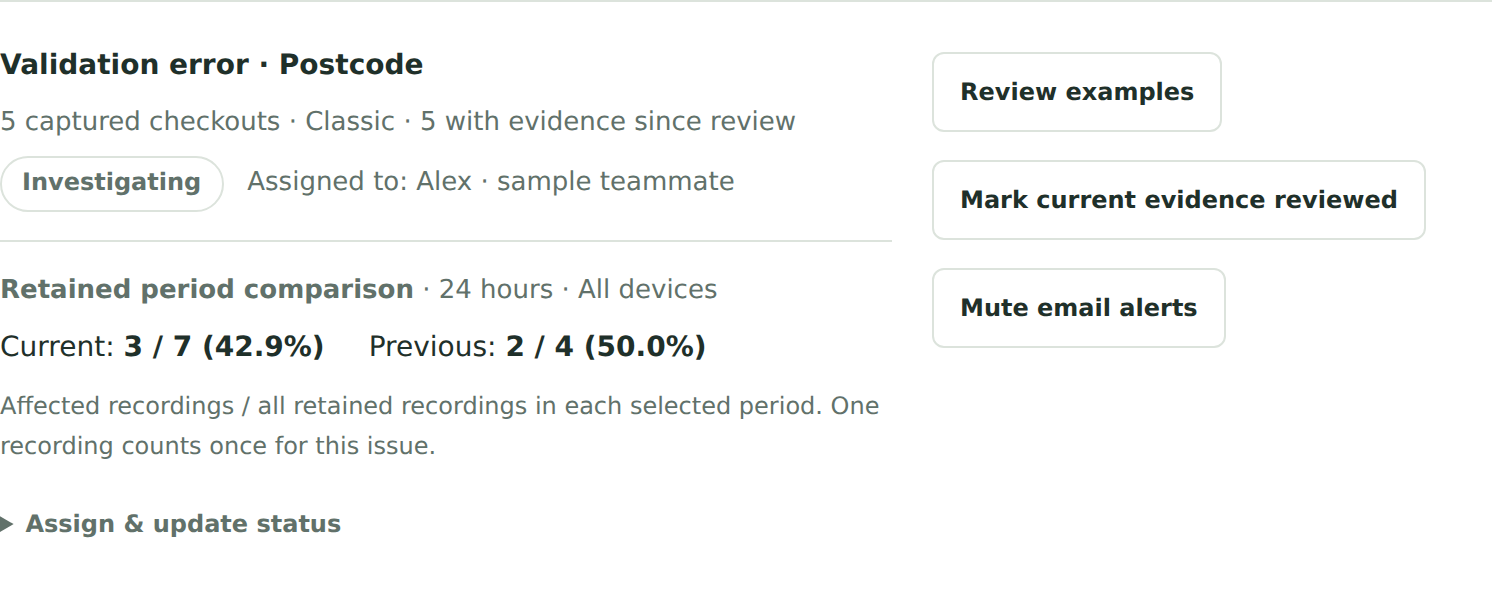
- Investigation ownership and before/after reviewAssign an investigation, retain its review status and compare observed issues across two periods. Comparisons cover retained recordings and do not establish an effect on sales.
An example workflow
Review an observed checkout error in Free. Add Pro when a developer needs timestamped notes, organized examples and a repeatable investigation list.
Requirements, setup and important limits
Requirements and first steps
WordPress 7.0+, WooCommerce 11.0+ and PHP 8.1+, transactional InnoDB tables and working WordPress scheduled tasks. Supports Classic shortcode checkout and Checkout Blocks on a secure same-site permalink; network activation is unsupported. These are compatibility floors: use maintained software supported by your host, and check your WooCommerce release requirements.
- Back up the store. In WordPress → Plugins → Add New Plugin, search for Frictions and install Free 1.2.20 from WordPress.org, or upload its official directory ZIP. Activate it alongside WooCommerce.
- Normal single-plugin activation opens full-screen setup. Choose a built-in prompt, CookieYes, Cookiebot, a custom consent bridge, or explicitly acknowledged owner-controlled recording. Review default-On textbox masking and storage, then choose Save and start recording. Verify a real shopper visit; no synthetic demonstration is needed.
- Use a separate signed-out shopper window with a nonempty cart. Grant permission in consent-based modes, verify that a real recording arrives, and test refusal or opt-out. Inspect masking and an offline test order; confirm that scheduled delivery and cleanup run on your host.
- For Pro, install matched Pro 1.2.20 after Free and explicitly activate its licence. For upgrades replace ZIPs without uninstalling; uninstalling Free removes its local recordings and settings.
Activation, updates and licences
Free setup’s installation-sharing and email-signup choices can both be skipped. Pro needs first licence activation; already activated local tools continue through ordinary expiry or temporary service outages.
Straight answers
Questions about Frictions
What is available to download or purchase?
Free 1.2.20 is available from WordPress.org. The separate Pro 1.2.20 add-on is available through Frictions.com and needs first licence activation. Update Free first, then Pro, without uninstalling. Choose a built-in prompt, a supported consent integration or explicitly acknowledged owner-controlled recording; no separate consent plugin is required for the built-in choices. Save and start recording deliberately, then verify a real shopper visit.
What data does the public demo use?
The published player screenshots and public demonstration use fictional checkout examples, not real customer sessions. The live demo remains on the older 1.1.2 structural player; it is not a preview of the current 1.2.20 visual capture. Install current Free on a staging store to verify its supported page appearance, textbox masking and real recording delivery.
Where should I get the installer and support?
Get Free from the official WordPress.org listing. Use Frictions.com for setup guidance, support and the separate Pro add-on. This catalogue does not host installers or process purchases.
What does installation require?
WordPress 7.0+, WooCommerce 11.0+ and PHP 8.1+, transactional InnoDB tables and working WordPress scheduled tasks. Supports Classic shortcode checkout and Checkout Blocks on a secure same-site permalink; network activation is unsupported. These are compatibility floors: use maintained software supported by your host, and check your WooCommerce release requirements.
Do I need an account or optional signup to start?
Free setup’s installation-sharing and email-signup choices can both be skipped. Pro needs first licence activation; already activated local tools continue through ordinary expiry or temporary service outages.
Go to the source
Your next step, in the right place.
Release and availability checked 12 November 2026. Interface images use demonstration data; their captions identify the source.
Different job? Another useful tool.
Related tasks, not a tested integration or a requirement to install more plugins.